Install the Warehouse App
CargoPRO Warehouse is a Flutter app for the CargoPRO courier & logistics system: one app for warehouse teams and managers — scan labels, work the intake queue, check shipments in, dispatch to drivers and create walk-in intake (shipment, locker package or pre-alert).
/api/warehouse/*) of the CargoPRO admin panel, which is
not included in this purchase and is sold separately as CargoPRO on CodeCanyon.
Admin panel 1.1.0 or later is required — an older backend does not have the
warehouse endpoints and the app will show empty queues. Running 1.0.0? Update the
admin panel to 1.1.0 first, following the update guide in its documentation.
Who uses it
| Role (userlevel) | Experience in this app |
|---|---|
| Manager (3) | Every warehouse, switcher on the dashboard, driver hand-offs on dispatch. |
| Warehouse (7) | Locked to their assigned office — queue, scan, check-in/out and intake only for that warehouse. |
| Super admin / Admin (1, 2) | Refused at login — pointed to the admin panel. |
| Driver (5) / Customer (6) | Refused at login — pointed to the driver / customer apps. |
Screens in the app
Eight screens, one per job:
| Screen | What it does |
|---|---|
| Login | Staff sign-in — only Manager (3) and Warehouse (7) accounts are admitted; everyone else is pointed at their own tool. |
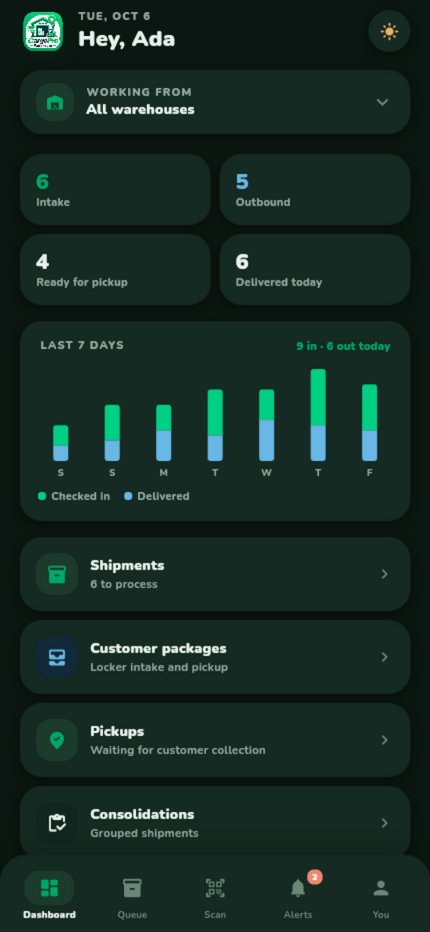
| Dashboard | Warehouse-scoped stats, a 7-day intake/delivered trend, quick shortcuts into the queues — and the warehouse switcher for managers. |
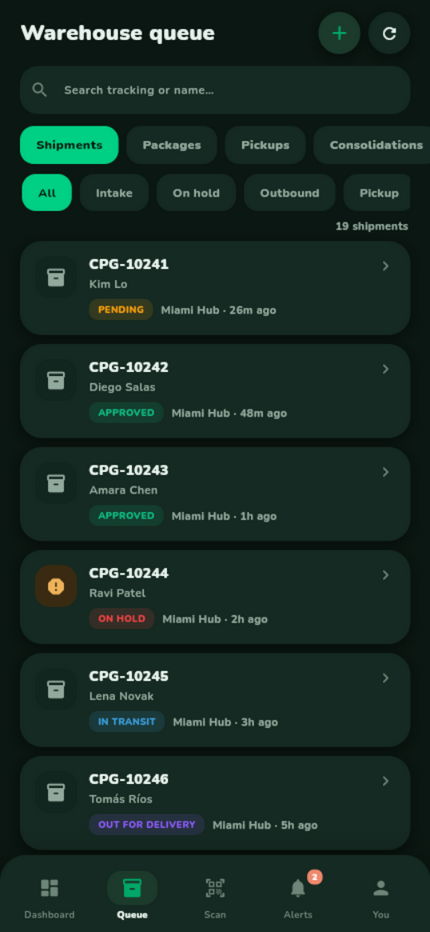
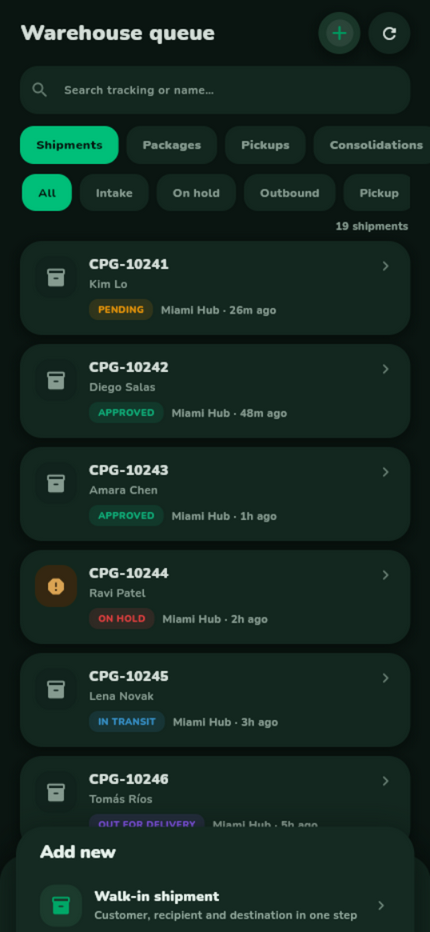
| Queue | Shipments and customer packages with search, status buckets (Intake / On hold / Outbound / Pickup / Closed) and infinite paging. The + button opens intake. |
| Intake (+) | Three creation sheets: walk-in shipment, locker package or a pre-alert on behalf of a customer. Tracking numbers are generated server-side. |
| Scan | Barcode/QR scanning with manual code entry for damaged labels; a result sheet opens the matched row. |
| Detail | Tracking number, status, warehouse, sender/customer facts, recent activity timeline — and the check-in / dispatch / driver hand-off actions. |
| Alerts | In-app notifications with unread badge and mark-as-read. |
| You | Account card, role and scope, theme toggle, sign out — and password-confirmed account deletion. |

Requirements
- Flutter 3.41+ with Dart 3.11+, and Android Studio for Android builds.
- For iOS: a Mac with Xcode and CocoaPods. The app supports iOS 15.0 and later.
- A working CargoPRO admin panel 1.1.0 or later, reachable over HTTPS.
- Staff accounts with the Manager or Warehouse role (create them as shown below).
- For push notifications (optional): a Firebase project — see Push notifications.
Setup steps
Get the packages
cd cargoprowarehouse
flutter pub get
Point the app at your server
The base URL lives in lib/core/api_config.dart and can
be set two ways — per build with a dart-define:
flutter run --dart-define=CARGOPRO_API_BASE=https://your-domain.com/api
or permanently by editing the defaultValue in
lib/core/api_config.dart (keep the
/api suffix). A release built without the dart-define uses
the compiled-in default, so prefer editing the default before your
production build.
Create the staff accounts
In the admin panel open Users → Management → Add,
choose the Warehouse role and assign the office
(warehouse), or the Manager role (no fixed office). The
account's userlevel (7 = warehouse, 3 = manager) is
what the app authenticates against — other roles are refused at
login.
Queue and scan access follows the backend
permissions (courier.view, scan.view,
customer-packages.view; mutations need
courier.status / customer-packages.status)
— you can tune a role server-side without an app release.
Walk-in intake (the + button: shipment, locker package,
pre-alert) needs the warehouse.intake permission — granted to the
Manager and Warehouse roles by default, listed under Warehouse App in
Roles & Permissions. A role without it can still create a single kind of
record if it holds the matching admin permission (courier.create,
customer-packages.create or prealerts.create).
Warehouse staff always register intake into their own office.
Run it
flutter run
Sign in with the warehouse or manager account. The dashboard of a warehouse user locks to the assigned office; a manager sees the warehouse switcher.
What each action does on the backend
Every screen action maps to a warehouse API endpoint
(/api/warehouse/*, Sanctum-authenticated). What each one
changes for real:
| Action in the app | Backend effect |
|---|---|
| Check-in a shipment / package | Assigns the warehouse, moves pending rows to Approved and writes a tracking event customers can see. |
| Dispatch (check-out) | Moves the row to In transit — or Out for delivery when a driver is passed. The driver is notified. |
| Driver hand-off | Same dispatch with a driver attached; the hand-off is recorded on the row. |
| Intake: walk-in shipment | Creates a shipment with a server-generated tracking number; catalog defaults are applied and it lands as incomplete so the office settles rates in the admin panel. |
| Intake: locker package | Creates a customer/locker package with a server-generated locker tracking number. |
| Intake: pre-alert | Creates a pre-alert on behalf of a customer (tracking number, store, courier, value). |
| Consolidations | Lists the same shipment and package consolidations as the admin panel. Update status and Mark delivered act on the consolidation record itself; warehouse staff see the consolidations that ship from their office. |
| Scan / type a code | Resolves an AWB (prefix+number), a bare order number, a purchase tracking number or a numeric id to the matching shipment or package. |
| Delete account (You tab) | Password-confirmed, permanent — reuses the documented account-deletion endpoint (managers and warehouse accounts included). |
What happens at startup
Two things, in lib/main.dart and
lib/app.dart:
- Portrait lock — operators work one-handed with a handheld scanner, so the app pins to portrait.
- Session restore — a saved token opens the shell straight away; no token means the login screen. The push service enables itself only when a Firebase configuration is bundled — without one it stays off and the app behaves identically.
Push notifications (optional)
The app runs normally without Firebase; push activates only when the Firebase configuration is present.
Add the app to your Firebase project
In the Firebase console, add an Android app with the package name
com.devtrixx.cargoprowarehouse (or your own, if you changed it)
and download google-services.json to
cargoprowarehouse/android/app/. The Gradle build applies the
Google Services plugin only when that file exists, so the project still
builds without it.
iOS
Add an iOS app with your bundle identifier, download
GoogleService-Info.plist and add it to the Runner
target in Xcode. Add the Push Notifications capability under Runner →
Signing & Capabilities (background remote notifications are already
enabled in Info.plist). Then upload an APNs key: in your Apple
Developer account create a key with Apple Push Notifications service,
and in Firebase open Project settings → Cloud Messaging → Apple app
configuration and upload the .p8 file with its Key ID and
your Team ID.
Connect the server
Pushes are sent by the CargoPRO admin panel. In the admin panel open Tools → FCM / Push Settings and upload the Firebase service-account JSON (Firebase → Project settings → Service accounts → Generate new private key).
Android permissions
| Permission | Why |
|---|---|
CAMERA | Barcode/QR label scanning. |
POST_NOTIFICATIONS | Alerts inbox push (Android 13+). |
INTERNET | Admin API access. |
Changing the app icon & splash
One master artwork drives the brand:
assets/logo.png (in-app mark) and
assets/icon/app_icon.png (launcher icon source, with
assets/icon/adaptive_foreground.png for Android
adaptive icons). After replacing them, regenerate the platform icons
— the flutter_launcher_icons configuration is already in
pubspec.yaml:
dart run flutter_launcher_icons
The command writes the Android launcher icons (all mipmap sizes and the
adaptive icon) and the iOS app icon set. Use a square PNG of at least
1024×1024 px without transparency for the iOS icon. Change the app name
shown under the icon in android/app/src/main/AndroidManifest.xml
(android:label) and, for iOS, CFBundleDisplayName in
ios/Runner/Info.plist.
Build a signed release
Release signing is already wired in
android/app/build.gradle.kts: when
android/key.properties exists, release builds are signed with your
keystore; without it they fall back to the debug key so
flutter run --release still works locally. To publish, create a
keystore and add android/key.properties:
keytool -genkey -v -keystore android/app/upload-keystore.jks -keyalg RSA -keysize 2048 -validity 10000 -alias upload
storePassword=your-keystore-password
keyPassword=your-key-password
keyAlias=upload
storeFile=upload-keystore.jks
storeFile is resolved from android/app/. Then build the
bundle with your server address:
flutter build appbundle --release --dart-define=CARGOPRO_API_BASE=https://your-domain.com/api
Keep the keystore and key.properties out of version control and back
them up — you need the same keystore for every future update of the app. Upload
build/app/outputs/bundle/release/app-release.aab in Google Play
Console, and increase the build number in pubspec.yaml
(for example 1.0.0+2) before every new upload.
iOS setup
iOS builds need a Mac with Xcode and CocoaPods. The app supports
iOS 15.0 and later, the minimum required by Firebase. The Xcode project
and the included ios/Podfile already target 15.0, so do not lower it.
Install the pods
cd cargoprowarehouse
flutter pub get
cd ios && pod install
If CocoaPods reports that a pod requires a higher minimum deployment
target, run pod install --repo-update.
Set signing in Xcode
Open ios/Runner.xcworkspace (not the .xcodeproj).
Under Runner → Signing & Capabilities, choose your Team and set
your own Bundle Identifier.
Build and upload
flutter build ipa --dart-define=CARGOPRO_API_BASE=https://your-domain.com/api
Upload build/ios/ipa/*.ipa with Transporter or Xcode
Organizer.
Troubleshooting
| Symptom | Cause & fix |
|---|---|
| Login refused, pointed at another app | The account's role is not Manager/Warehouse — check userlevel (3 or 7) in Users → Management. |
| Empty dashboard/queues | The backend is older than the app — the warehouse API module is missing. Update the admin panel to 1.1.0, following the update guide in its documentation. |
403 on scan or check-in | The role is missing scan.view / courier.status — grant it in Roles & Permissions. |
| Network errors after release build | The build used the compiled-in default URL — set your server via dart-define or edit api_config.dart and rebuild. |
| No + button in the queue | The role lacks warehouse.intake (and the matching create permissions) — enable it under Roles & Permissions → Warehouse App. |
| Warehouse user sees other offices' rows | They are a manager by role — managers intentionally see every warehouse. |