Demo Data
A complete, connected demo dataset — two test accounts and one order in every status — so you can explore the admin panel and both apps before entering real data.
What you get
The demo dataset is created by MasterDemoSeeder
(cargoproadmin/database/seeders/MasterDemoSeeder.php). Everything is
owned by one demo customer, so the whole slice hangs together: prealerts convert
into packages, packages join consolidations, payments settle orders and every
event lands in the notification inbox.
| Record | What the seeder creates |
|---|---|
| Demo customer | customer@devtrixx.com / 12345678 — locker LK10000001, one default address (Home, Miami) and two address-book recipients |
| Demo driver | driver@devtrixx.com / 12345678 — vehicle TRK-01, assigned to the in-transit, out-for-delivery and delivered orders and the active pickups |
| Packages | 11 customer packages (OS9000001–OS9000011) — one per system status, each with a line item and courier tracking history |
| Shipments | 11 shipments (AWB9100001–AWB9100011) — one per status, with items, sender/recipient address rows and history |
| Pickups | 8 warehouse pickups (PCK9200001–PCK9200008) covering the whole pickup lifecycle |
| Prealerts | 5 prealerts (DMO-SHOP-0001–DMO-SHOP-0005) — 4 pending plus 1 already converted into the in-transit package |
| Payments | 6 gateway transactions (stripe / cash / paypal / paystack — approved, pending and failed) plus 3 settled per-order charges |
| Consolidations | 2 consolidations (CON90000001 pending, CON90000002 delivered) with linked packages and shipments |
| Inbox | 8 notifications (6 unread, 2 read) covering every event family — prealert, registration, status change, delivery, pickup and payment |
| Tracking history | A plausible courier_track timeline (Registered → Arrived at warehouse → In transit → Out for delivery → Delivered) for every demo order |
The 11 statuses covered — exactly one package and one shipment each:
Demo customer
Sign in to the user app (or the customer
side of the website) with customer@devtrixx.com /
12345678. You get a locker, an address book, recipients and the
full order history above — including an on-hold package waiting for an
invoice upload and a prealert ready to convert.
Demo driver
Sign in to the driver app with
driver@devtrixx.com / 12345678. The assigned
in-transit, out-for-delivery and pickup tasks appear on the driver's task
list, ready to be worked through.
How to import
During installation (recommended)
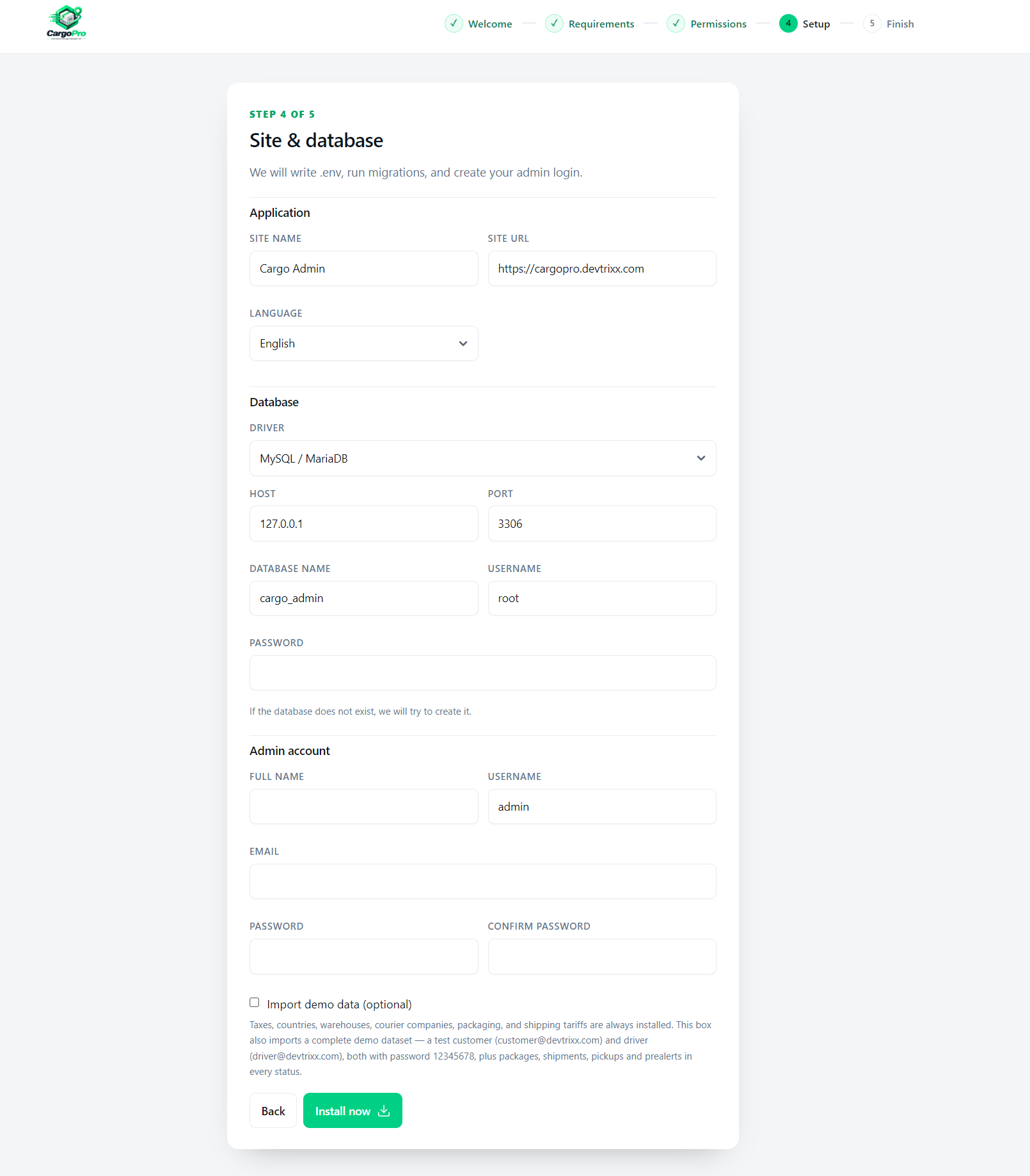
On the setup step of the installation wizard, tick the checkbox labelled “Import demo data (optional)” before finishing the install. The demo dataset is seeded right after the core seeders run.
On an existing install (CLI)
From the cargoproadmin/ folder, run:
php artisan db:seed --class=MasterDemoSeeder
Finish with: MasterDemoSeeder: demo data ready — customer@devtrixx.com / driver@devtrixx.com (password 12345678).
RbacSeeder and the permission seeders (roles and permissions),
ToolsSettingsSeeder (settings, templates, payment gateways) and
CatalogDefaultsSeeder (taxes, countries, warehouses, courier
companies, packaging, shipping tariffs). Only the demo dataset is opt-in.
How to remove demo data
Everything demo is owned by the two demo accounts, so deleting by their
sender_id / customer_id removes the whole slice without
touching real data. Demo rows are easy to spot by their tracking numbers:
| Demo rows | Tracking numbers |
|---|---|
| Packages | OS9000… (OS9000001 – OS9000011) |
| Shipments | AWB9100… (AWB9100001 – AWB9100011) |
| Pickups | PCK9200… (PCK9200001 – PCK9200008) |
| Prealerts | DMO-SHOP-… (DMO-SHOP-0001 – DMO-SHOP-0005) |
| Consolidations | CON… (CON90000001 – CON90000002) |
Delete the orders first, then the accounts, with
php artisan tinker:
$ids = App\Models\Account::whereIn('email',
    ['customer@devtrixx.com', 'driver@devtrixx.com'])->pluck('id')->all();

// Orders owned by the demo customer (AWB shipments + PCK pickups + OS packages)
$awb = DB::table('add_order')->whereIn('sender_id', $ids)->pluck('order_id')->all();
$os  = DB::table('customers_packages')->whereIn('sender_id', $ids)->pluck('order_id')->all();
DB::table('detail_add_order')->whereIn('order_id', $awb)->delete();
DB::table('address_shipments')->whereIn('order_id', $awb)->delete();
DB::table('customer_package_items')->whereIn('order_id', $os)->delete();
DB::table('add_order')->whereIn('order_id', $awb)->delete();
DB::table('customers_packages')->whereIn('order_id', $os)->delete();

// The rest of the demo slice
DB::table('courier_track')->whereIn('user_id', $ids)->delete();
DB::table('pre_alert')->whereIn('customer_id', $ids)->delete();
DB::table('payments_gateway')->whereIn('order_track_customer_id', $ids)->delete();
DB::table('charges_order')->whereIn('user_id', $ids)->delete();
DB::table('consolidate')->whereIn('sender_id', $ids)->delete();
DB::table('notifications')->whereIn('user_id', $ids)->delete();
DB::table('notifications_users')->whereIn('user_id', $ids)->delete();

// Finally the two accounts and their profile rows
DB::table('recipients')->whereIn('sender_id', $ids)->delete();
DB::table('user_addresses')->whereIn('user_id', $ids)->delete();
DB::table('virtual_locker')->whereIn('user_id', $ids)->delete();
DB::table('role_user')->whereIn('user_id', $ids)->delete();
DB::table('users')->whereIn('id', $ids)->delete();